Most training is a quiz in disguise, and everyone can tell. The Education Station turns it around: it's a game first, and the learning comes along for the ride. Inside one game are ten different mini-games, from popping balloons to cracking a vault, and every one of them plays with the same questions and facts: yours.
Each day your players open it, it serves up a different mini-game. They learn your material from ten different angles, they win a prize every time they finish, and the game quietly brings back the questions they got wrong until they get them right. Use it to train your team, or to teach your guests about your promotions, your property, or anything else worth knowing.
The pitch in one line: write your questions once, and The Education Station turns them into ten different games, one a day, with a prize for every finished game, personal best times to beat, and a Final Quiz to finish the month.
What Is The Education Station?
It's one game in your Promo on Demand library, with ten mini-games inside. You build it once, as a custom game: your questions and facts, your schedule, your prizes. Then each day, the game decides which mini-game is today's and opens straight to it.
- A new game every day. You map a mini-game to every date on a calendar, so Monday might be Pop the Answer and Tuesday Vault Code Cracker.
- Played once a day. Each player gets one play a day, and the day starts again at midnight in your property's time zone.
- Everyone who finishes wins. Every completed game wins a prize from the prize pool you set up, however the player did. The learning is the point; nobody is punished for a wrong answer.
- Any device. It fills the screen of a phone, a tablet or a computer, upright or sideways. There's no app to download.
Want to see it for yourself? Play The Education Station in our Game Library. No sign-in needed.
The Ten Mini-Games
Each mini-game turns the same questions and facts into a different challenge, so the material stays fresh on day twenty. All ten are timed, none of them ends because of a wrong answer, and every one finishes with a review of the right answers.
-
Odd One Out
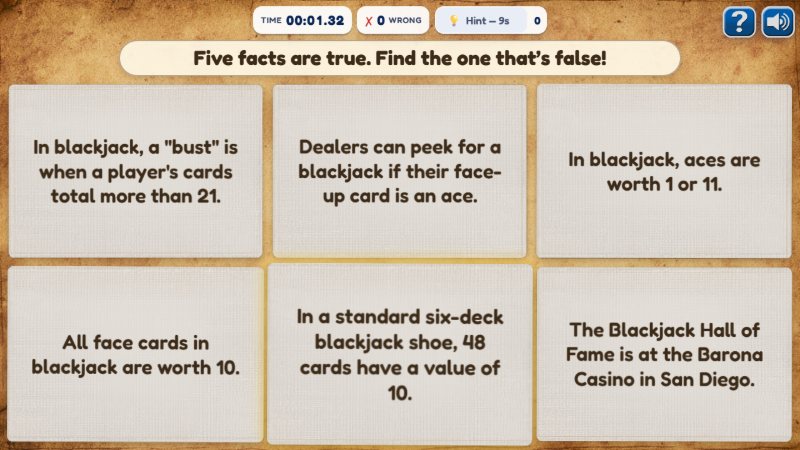
Six fact cards are dealt: five are true and one is false. Find the false one. A wrong pick is stamped TRUE and stays on the board, so even a miss teaches something.
-
Pop the Answer
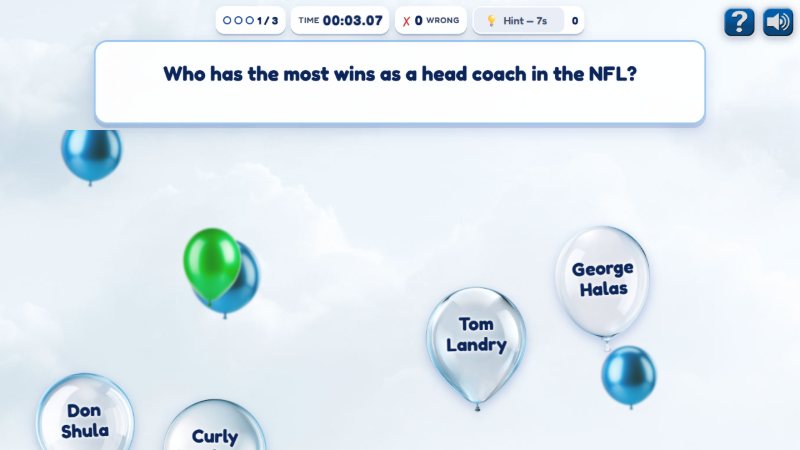
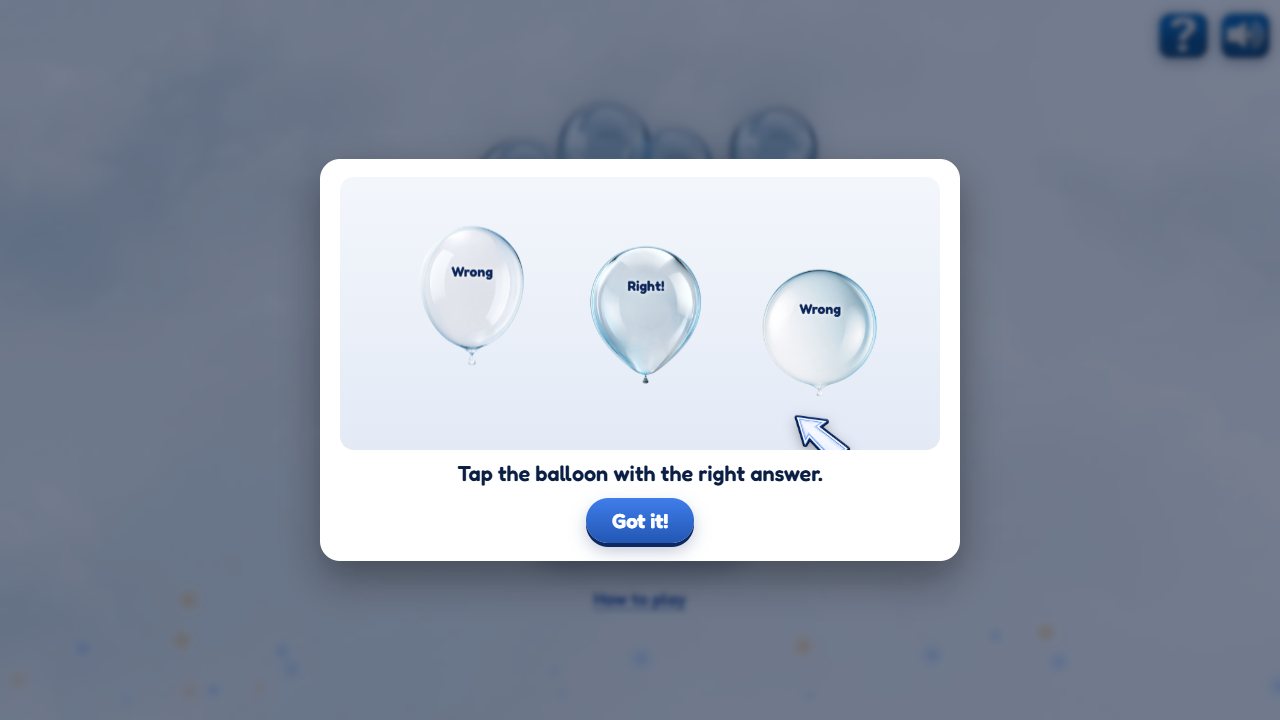
The question stays at the top while answer balloons float up from below. Pop the right one. A wrong answer floats back later on another balloon, so nobody runs out of chances.
-
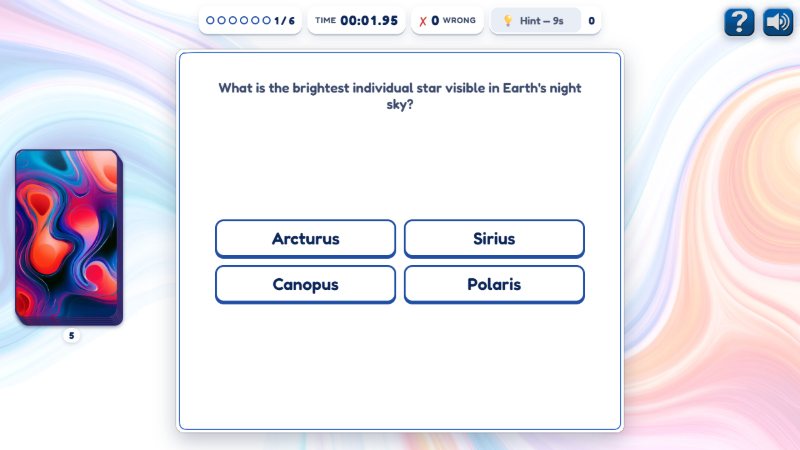
Flashcard Flip Race
Flip each card and pick its answer. Miss one, and the card goes to the back of the deck with that answer crossed out, to try again. Clear the deck against the clock.
-
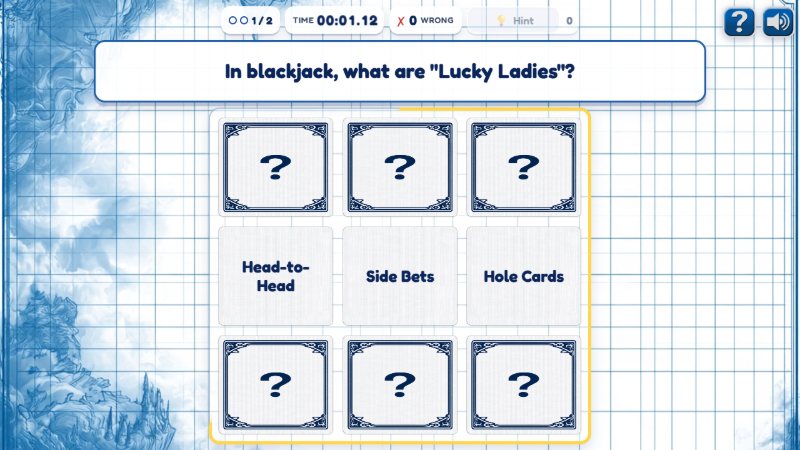
Rapid Recall Grid
The answers flash up in a grid for a moment, then flip face down. Tap where the right answer was. A memory game that makes players read every option.
-
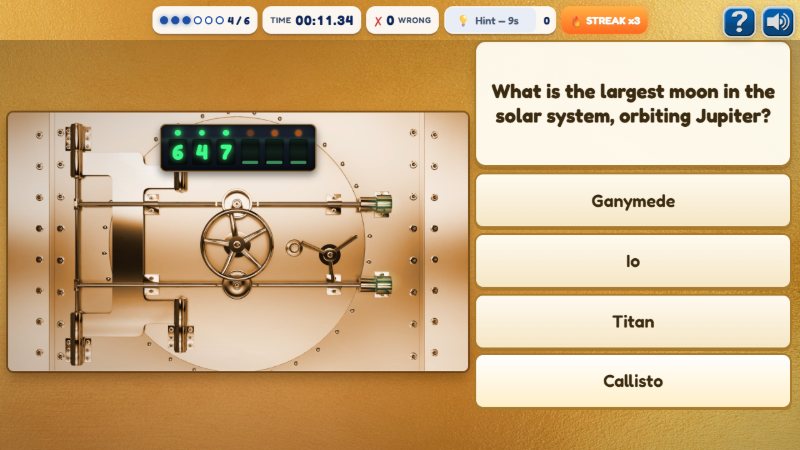
Vault Code Cracker
Every right answer spins one digit of the vault's code into place. A missed question comes back at the end with the wrong answer crossed out. Crack all six and the safe swings open.
-
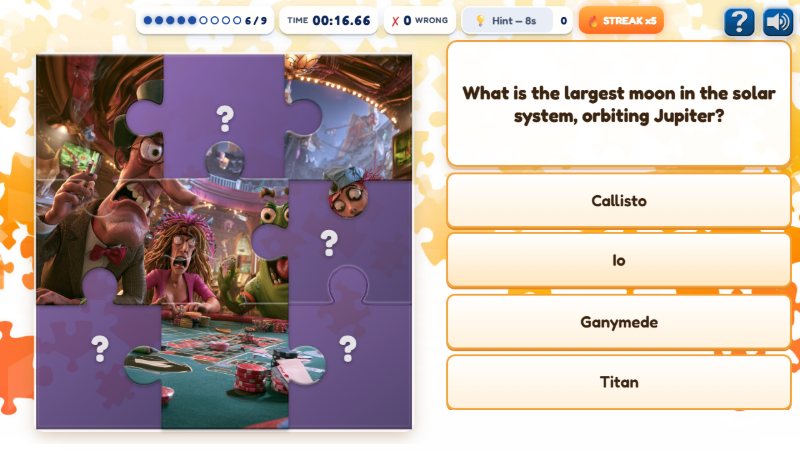
Jigsaw Reveal
Nine questions, nine puzzle pieces: each right answer flies a piece of a hidden picture into place. Use our pictures, or upload your own.
-
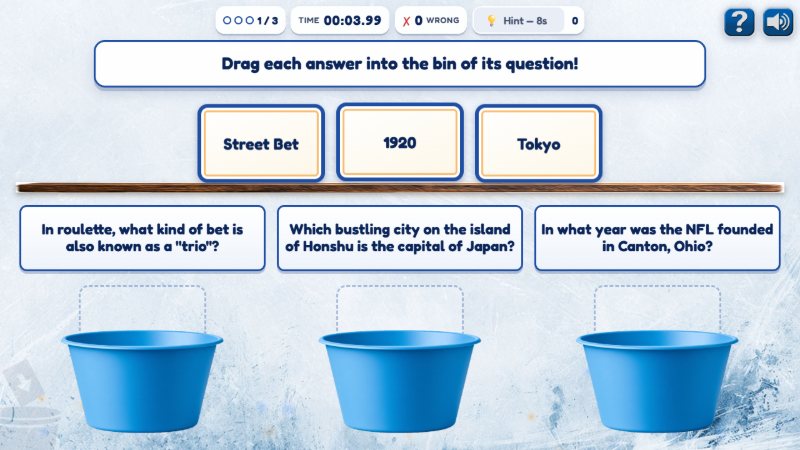
Sort It
Drag each answer into the bin of its question, then check. The game only says how many are right, never which ones, so players have to think it through.
-
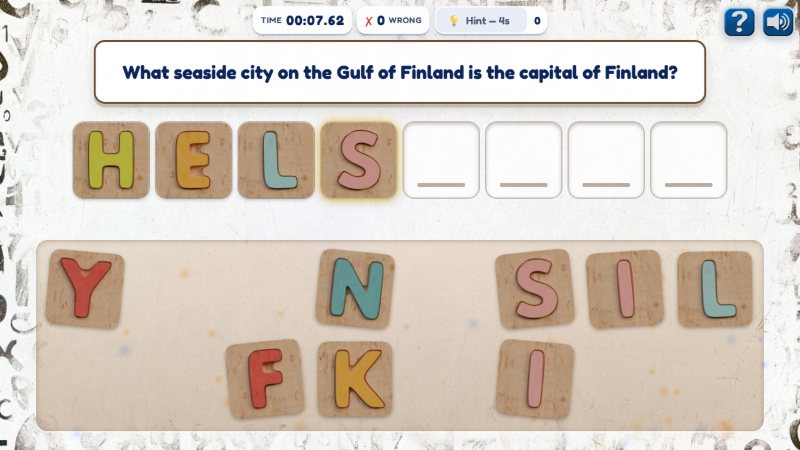
Word Builder
Spell the answer with wooden letter blocks, dragged or tapped into place. A couple of spare letters mean players have to know it, not just unscramble it.
-
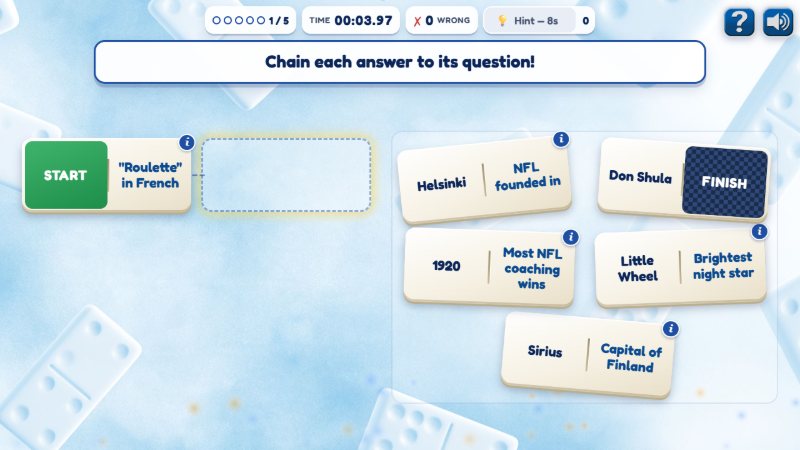
Connect the Facts
A chain of dominoes: each domino's answer half matches the question half of the one before it. Build the chain from START to FINISH.
-
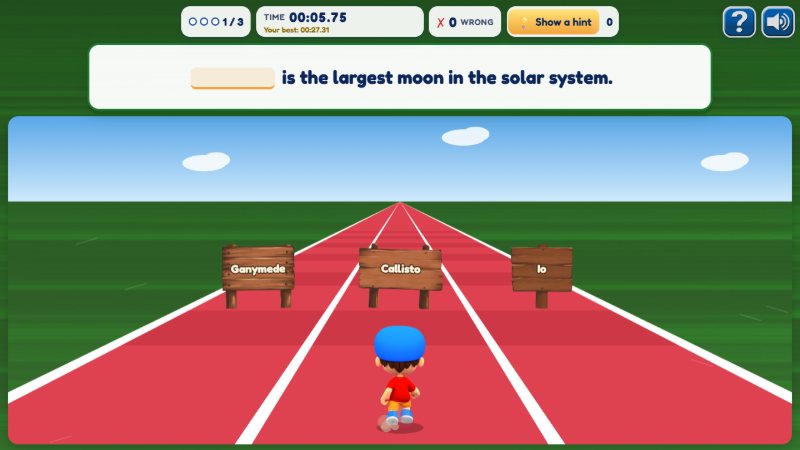
Fill in the Blank Runner
A sentence with a blank sits at the top while a runner races down a three-lane track. Steer into the sign with the missing word.
You choose which mini-games to use, and each one has its own settings, like how many questions it asks. Leave all ten on for the most variety, or switch off any that don't suit your material.
Write It Once, Play It Ten Ways
The Education Station has one shared pool of content: up to 30 questions, each with its answers, plus up to 30 true facts and 30 false ones. You fill it in once, and every mini-game draws from it. Nobody writes ten quizzes for ten games.
Each mini-game takes what fits it. Flashcard Flip Race and Vault Code Cracker use your questions as they are. Odd One Out uses your facts. Connect the Facts needs a short version of each question to fit on a domino, Fill in the Blank Runner needs the question written as a sentence with a blank, and the games with little room need short versions of long answers. Fill those in, and the same question works in all ten games.
The setup page checks as you go. A health check under your content shows which mini-games each question works in, and why not when it doesn't, and every mini-game shows whether it has enough to play.
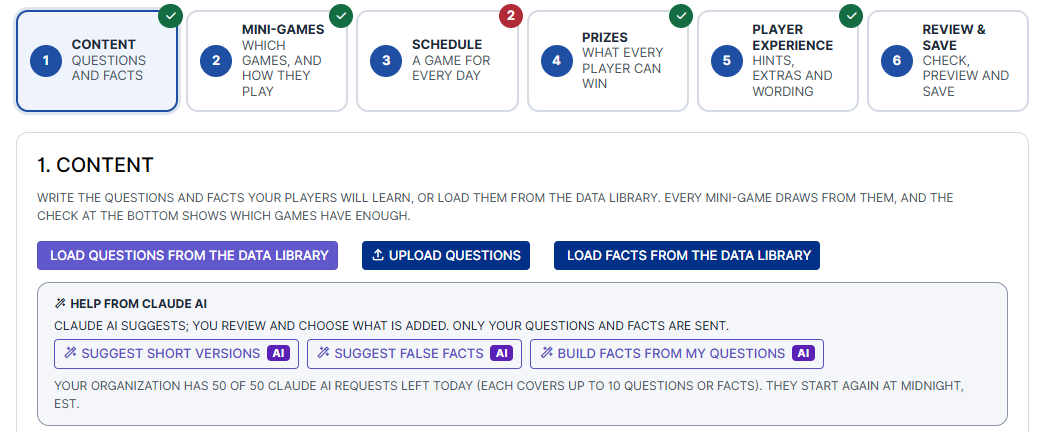
Three ways to fill it
- Load it from the Data Library. Pick categories from our library of ready-made trivia and facts (more below).
- Upload a spreadsheet. An Excel file with a question, its correct answer and up to four answers per row. Download our sample to start from.
- Type your own. Add questions and facts one at a time, right on the page.
Claude AI can do the fiddly part. Three buttons ask Claude AI to suggest the short versions and fill-in-the-blank sentences your questions are missing, false facts to go with your true ones, or a true and a false fact built from each of your questions. You review every suggestion before anything is added, and a false fact is only added once you tick that you've checked it's false. Only your questions and facts are sent, never anything about your players, and your organization has a daily allowance of requests, shown on the page.
Faster to load, too
Ten games' worth of pictures, music and animation adds up to well over 100 MB. Your players never download it all. Opening the game loads only the main menu, about half a megabyte. While the player looks at the menu, today's mini-game, and only today's, downloads in the background, so by the time they press Play it's usually ready. A quick start matters on a phone with weak signal, and it matters more when someone is playing on a break.
Start From the Data Library
Don't have questions written yet? The Data Library is Promo on Demand's own collection of trivia questions and true-and-false facts, thousands of them, filed under 19 categories and more than 130 topics. Load questions from the Data Library and Load facts from the Data Library open a picker: tick the topics you want, see every question with its answers, and choose them yourself or press Random to fill all 30 evenly across your topics.
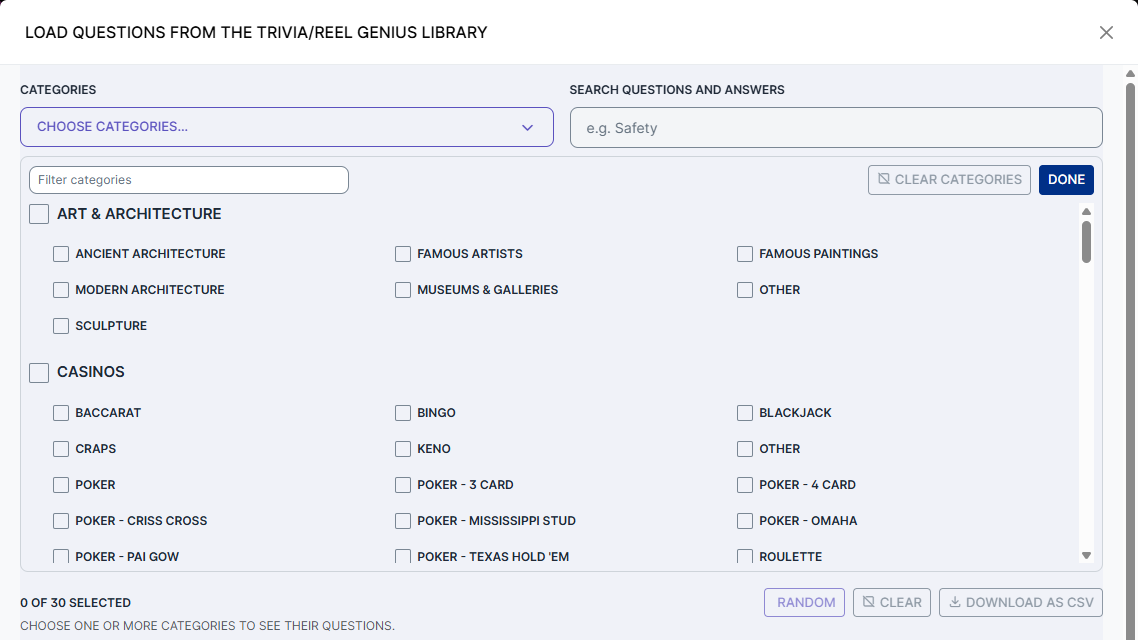
A sample of what's inside:
| Category | A sample of its topics |
|---|---|
| Casinos | Blackjack, Baccarat, Roulette, Craps, Slot Machines, Video Poker, Texas Hold 'Em, Pai Gow, Bingo, Keno |
| Holidays | Thanksgiving, Christmas & Hanukkah, Halloween, New Year's, Valentine's Day, St. Patrick's Day, 4th of July, Veteran's Day |
| Sports | Football, Basketball, Baseball, Hockey, Soccer, Golf, Horse Racing, Olympics |
| Food & Drink | Wine & Beer, Beverages & Cocktails, Global Cuisine, Baking & Desserts, Culinary Terms |
| Entertainment & Music | Movies, Television, Celebrities, Awards, Concerts, Festivals, Classical Music |
| Science & Technology | Astronomy, NASA, Earth Sciences, Biology & Medicine, AI, Gaming Technology |
| History & Geography | Ancient Civilizations, Historical Figures, Countries & Capitals, Cities, Wonders of the World |
| And more | Art & Architecture, Language & Literature, Nature & Wildlife, Weather, Transportation, Shopping (Black Friday, Cyber Monday), Major Events, General Trivia |
A loaded question comes with its correct answer and up to three wrong ones. Library facts come paired: each true fact arrives with a false version of itself, and Odd One Out never deals the two together, which would give the answer away. Mix library content with your own as you like: load the library first, then change or add whatever you want.
A Game for Every Day
The Schedule step is a calendar of real dates. Choose the first and last day, then put a mini-game on each one: drag a game onto a day, or choose it from the day's list on a phone or with a keyboard. Games can repeat as often as you like. Fill the empty days for me does it in one click, taking turns through the mini-games you've switched on and never putting the same one on two days running.
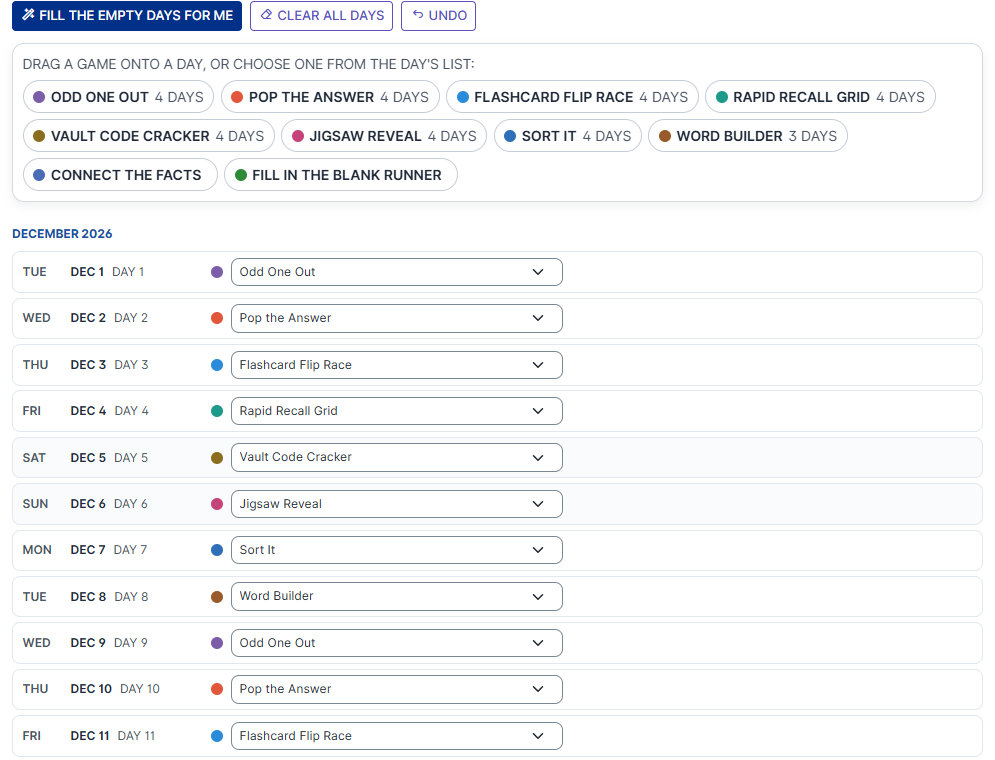
Days are your organization's days: a new one starts at midnight in your time zone, the same moment a player's daily play comes back. The same schedule works two ways:
In Assisted Play Your team runs it
When your staff run the game on a tablet or a screen on your floor, it plays the day's mini-game from your schedule. Before the first date or after the last, it keeps taking turns through the schedule in order, so there's always a game to play.
In a Campaign Players on their own devices
Add it to a campaign and it's played once a day by each participant; the wizard sets that for you. The game's card in the wizard shows its schedule's dates, and Change dates moves the whole schedule to a new first day, keeping the order. So you can build December's game in November and line it up with the campaign in one step. If the campaign runs longer than the schedule, the wizard tells you, and the mini-games repeat in order.
Built for Learning, Not Just Playing
Every mini-game follows the same rules, and every one of them is there to help the material stick:
- A miss never ends the game. The player keeps trying, and where the game allows, the right answer is shown long enough to read.
- The clock counts up, never down. It gives a sense of urgency without a penalty. Nobody runs out of time.
- Hints, for a price. A hint button counts down, then offers help: it crosses out a wrong answer, pops a wrong balloon or places a letter. A hint carries no penalty, but the clock keeps running while a player waits for one. You can switch hints off for any mini-game, or for all of them.
- A demo the first time. The first time a player opens a mini-game, a short animation shows them how it's played. It's skippable, and "How to play" replays it any time.
- A full review at the end. The game over screen lists every question with its right answer, marked ✓ or ✗, with the number of wrong tries and hints for each.
It Remembers What Each Player Missed
Here's where The Education Station gets clever. When a player gets a question wrong, or needs a hint for it, the game makes a note. On the days after, that question is more likely to come up again: three times as likely after one miss, and up to seven times as likely for a question they keep missing. The moment they answer it right on the first try, without a hint, the note is cleared.
It's the idea behind flashcards that go back in the pile, done for you. Players spend their time on what they don't know yet, not on what they already do. When a question they'd missed before comes back and they nail it, the review at the end says so: "Got it this time!"
Nothing is forced. Every question can still come up, no question appears twice in one play, and how much extra weight a miss carries is a setting you can change. The notes are kept on the player's own device and hold nothing about the player, just which questions were missed and when.
Personal Bests: a Reason to Play Again
Every mini-game is timed, and The Education Station remembers each player's best time for each one. It shows on the mini-game's title screen and under the clock while they play. When a player beats it, the game over screen celebrates with a NEW BEST TIME! ribbon, and then sets the next challenge: "Can you beat 00:19.92 next time?"
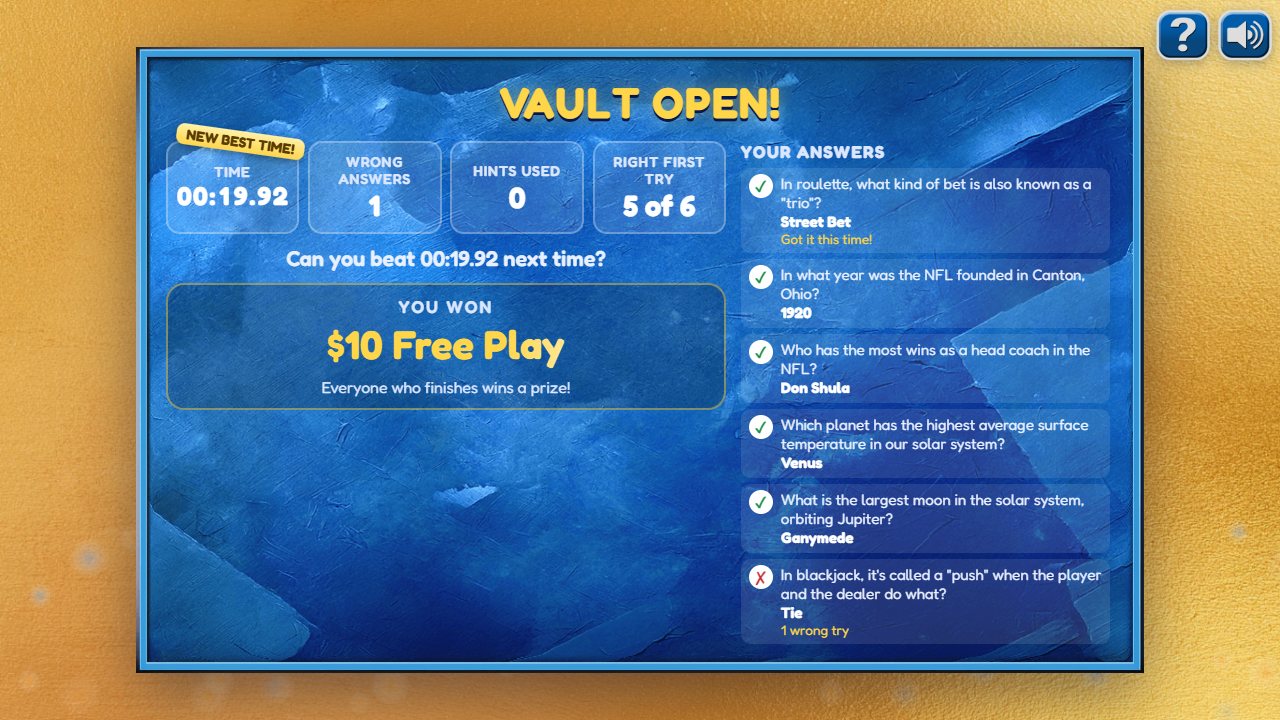
- Kept on each device. Records live on the player's own phone, tablet or computer. They hold only a time and a date, nothing personal.
- Kept per custom game. Each custom game has its own records. Build a new custom game for a new month or a new campaign, with new questions, and everyone starts with a clean slate; edit a game, and its records are kept.
- Only for a finished game. Any finished game can set a record, wrong answers and hints included.
Because records belong to the device, a tablet passed around your break room shares one set of records, and a private browsing window keeps none. You can switch best times off on the Player experience step if they don't suit your game.
None of this changes a prize. The stats are there to make players think "I can be faster" and "next time, no hints", which is exactly the kind of thinking that makes them come back tomorrow.
The Final Quiz
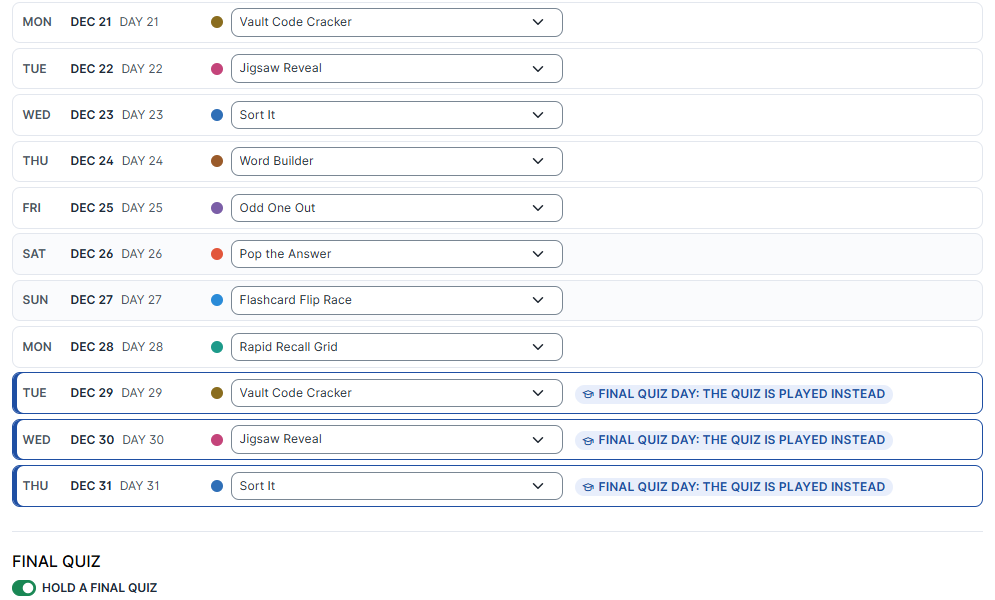
After a month of mini-games, find out what stuck. The Final Quiz is an optional, cumulative quiz over the questions you pick, between 5 and 30 of them. Switch it on at the foot of the Schedule step and choose its first and last day; three to five days at the end of the month works well. On those days the quiz replaces the day's mini-game, and if your schedule runs on afterwards, the mini-games pick up again.
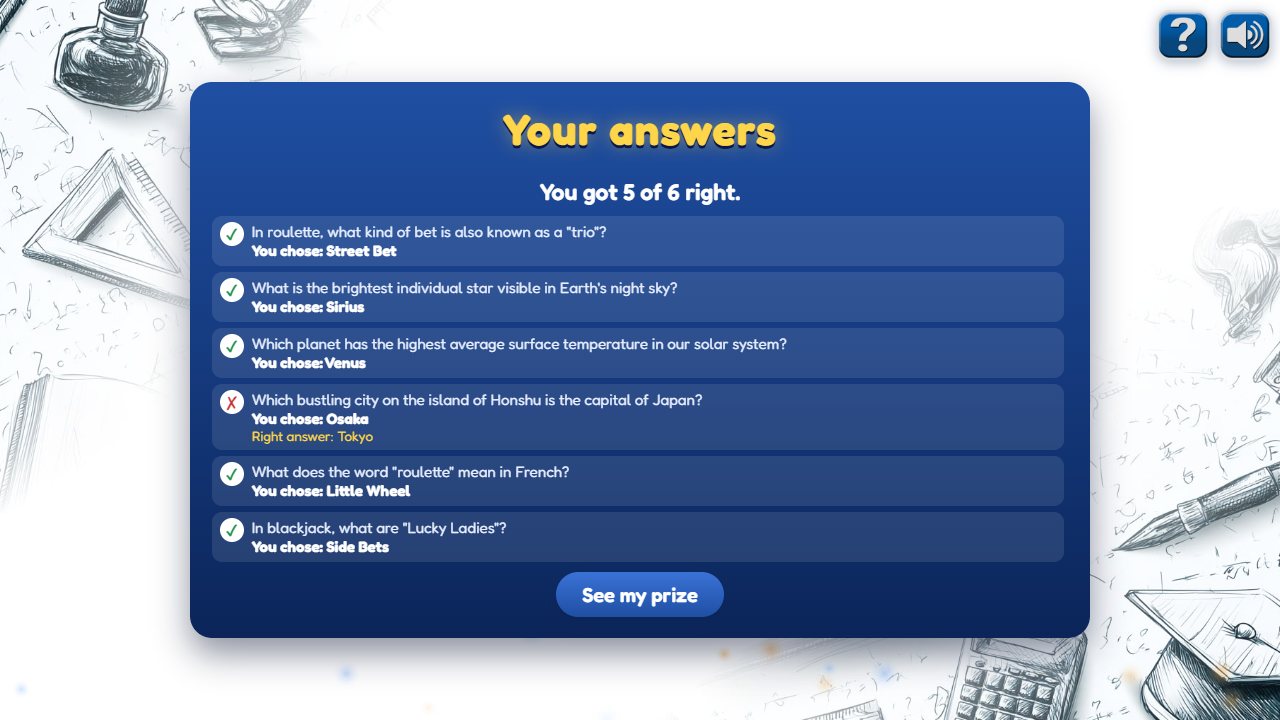
The quiz is multiple choice and timed like the mini-games, with no hints. Players don't see right or wrong while they answer. At the end, a review screen shows every answer they chose, a ✓ or ✗ beside each, and the right answer to every one they missed, so the quiz teaches too.
Two prize lists: the first try counts most
The Final Quiz has its own two prize lists, separate from the mini-games' prizes:
| Feature | Perfect on the First Try | Every Other Try |
|---|---|---|
| Who wins from it | A player who gets every answer right on their first attempt | A first attempt with a miss, and every attempt after the first |
| What to put in it | Your best prizes: the reward for studying all month | Smaller prizes that still thank everyone for trying |
| Prize mode | Variable odds, or one-to-one | Variable odds, or one-to-one |
Each list can be drawn by odds (up to 12 prizes, adding up to 100%), or one-to-one, with its own reward list naming each player's prize and its own default prize for everyone else. Players get one try a day, like any other day's game, so a player who misses can come back tomorrow and earn a prize from the second list.
In a campaign, the answers are graded by our servers, not by the player's browser. No one can claim a perfect-score prize without a perfect score, and no one gets a second "first attempt". In Assisted Play, where nobody signs in, every attempt counts as a first one.
One Prize Pool for All Ten Games
You don't set up prizes ten times either. All ten mini-games share one prize pool: up to 12 prizes, each with its odds, adding up to 100%. Whichever mini-game a player plays today, a finished game draws from the same pool, and the Budget Projection shows what that pool will cost you over the plays you expect.
Variable Odds You set the odds
Load your prizes and decide how likely each one is: a good chance at drawing entries, a smaller one at free play or a meal. Every play draws one.
One-to-One The exact reward, for the exact person
In a one-to-one campaign, upload a reward list naming the prize each participant gets, matched by loyalty number or by name and email. Each play uses their next reward on the list, and a default prize covers everyone the list doesn't name.
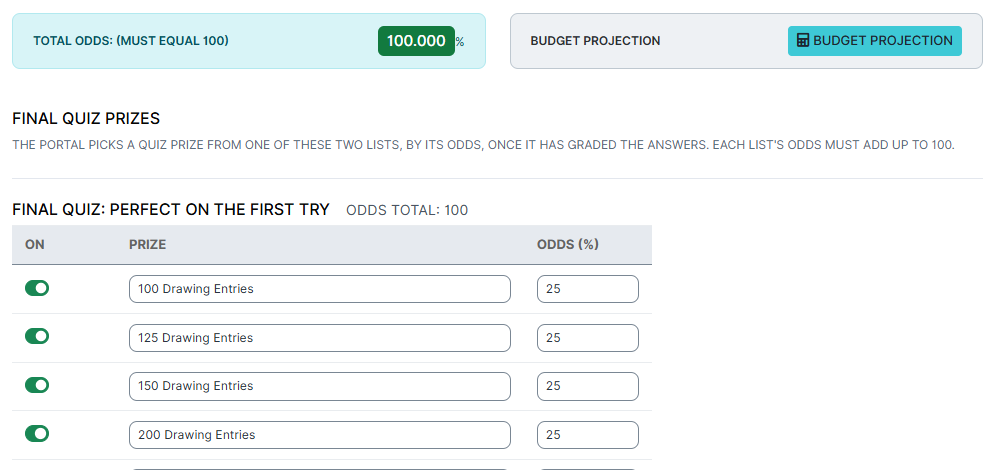
A combination that works: drawing entries in the mini-games' pool, so every day's play counts toward a monthly drawing at no cost per play, and your headline prize in the Final Quiz's first-try list. Players who learn the material all month are the ones with the best shot at the big prize.
Part of a Simultaneous Games Campaign
The Education Station fits right into a Simultaneous Games Campaign, alongside your other games:
- As a Daily Play game. Put it on the Daily Play calendar, and it appears as one of the day's game cards next to your prize wheel or scratch card. Its card always plays that day's mini-game from its own schedule. The campaign's calendar only decides which days the card is on the menu.
- As an Auto-Launch game. Make it your featured game, and today's mini-game opens the moment a participant arrives.
- On Final Quiz days, its card turns into the quiz's card: a Final Quiz ribbon, the note "Answer every question. Your first try today counts most!", and a Take the Quiz button.
Put it on the menu every day and it becomes the learning thread running through your promotion, while the other games bring the variety. It works in every other campaign type too: as the one game in a Single Game campaign, one in a series, or the bonus game in a Pro Football Pick 'Em or Prop Card Challenge.
Educate Your Team
Training only works if people do it, and people play games. Run an invite-only campaign for your team and give them a few minutes of learning a day, on their own phones, on a break. Some ideas:
- Onboarding. Policies, benefits and who to call, learned over a new hire's first month instead of in one long afternoon.
- Safety and compliance. The procedures everyone should know by heart, brought back again and again for the people who keep missing them.
- Service standards. Your greeting, your guest recovery steps, your property's way of doing things.
- Product knowledge. This season's menu and wine list for servers, the rules of your table games, the details of this month's promotions so every team member can answer a guest's question.
- Your property. Every restaurant, every venue, the hours and the room names, so nobody ever says "I don't know" when a guest asks where to go.
See what each person learned. Every campaign play keeps its results. On the campaign's Play Audit tab, and on a participant's Login History, click the game's name to see that play as the player saw it: their time, their stats, every question, whether they got it right first time, and the prize they won. It's a simple way to see who's keeping up, and which questions everyone is struggling with.
Pair it with a reward people want: drawing entries every day toward a monthly drawing for a reserved parking spot or an extra day off, and a Final Quiz with a bigger prize for a perfect first try. See Employee Recognition Campaigns for more ways to reward your team.
Educate Your Guests
The same game works just as well on the other side of the counter. Your guests are already curious, and a prize gives them a reason to find out:
- Your promotions. "What day is double points?" Guests who play the quiz know the answer, and they'll show up for it.
- Your venues. The steakhouse's signature dish, the spa's new treatment, the headliner coming next month. Upload photos of your property to Jigsaw Reveal, and every right answer reveals a little more of your new pool or your newest restaurant.
- How to play. Blackjack, craps and roulette facts from the Data Library help new players feel at home at your tables.
- Just for fun. Holiday trivia in December, football facts in the fall, general knowledge any time: a daily reason to open your campaign.
Make the Final Quiz the event. Announce the quiz days on your campaign page from day one: "Play every day, then ace the Final Quiz on the 29th for a chance at our biggest prize." Players who know a big prize is waiting will treat every day's game as practice.
Thoughtful Touches
- In the player's language. When your campaign page offers a language selector, the game plays in the language the participant chooses: your questions, answers and prizes, and the game's own words. Results are still recorded in English for you.
- Celebrations that change. Confetti, fireworks, a coin shower, a star burst or streamers, never the same one twice in a row, with an extra flourish for a new best time or a perfect game.
- Built for everyone. Every drag has a tap alternative and works from a keyboard, right and wrong are shown with ✓ and ✗ as well as color, screen readers hear what changes, and motion calms down for players who've asked their device for less of it.
- Preview any day. On the last setup step, Preview opens a test menu where you can play any of the ten mini-games and see which game any date will play.
Get Started
Open Games in the Admin Tool and choose The Education Station; if it isn't in your list yet, ask our team to add it. Building one takes six steps, and the page tells you what's left at every one:
- Content. Load questions and facts from the Data Library, upload a spreadsheet or type your own, and let Claude AI suggest the short versions.
- Mini-games. Switch on the games you want, and check each one has enough content.
- Schedule. Choose your dates and fill the days, and add a Final Quiz if you want one.
- Prizes. Set up the shared prize pool, and the Final Quiz's two lists.
- Player experience. Hints, best times, the how-to-play demos and the game's wording.
- Review & save. Fix anything listed, preview it, and save. Then add it to a campaign, or play it in Assisted Play.
Try it first in the Game Library, or for help planning your first month of questions.